Turboline: Integrating Dynamic Typography into Creative Workflows
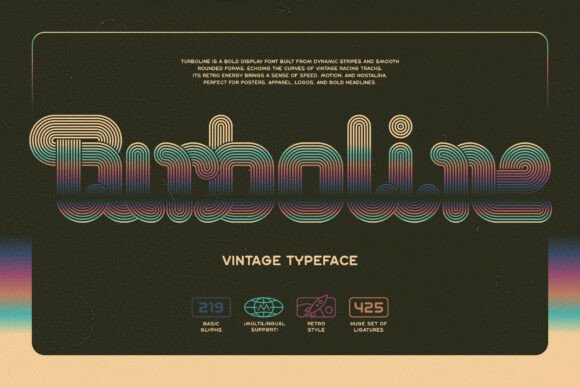
Typography plays a pivotal role in shaping the visual identity of a project, whether it's a brand logo, marketing poster, or apparel design. Turboline stands out as a bold display font that combines retro aesthetics with modern design functionality. Its dynamic striped elements and smooth, rounded forms echo the curves of vintage racing tracks, making it a powerful visual tool for designers seeking to evoke motion, nostalgia, and energy.
Understanding Turboline’s Design Language
At its core, Turboline is more than a font—it's a stylistic statement. The font’s retro-inspired design channels the spirit of mid-century racing culture, with its signature striped elements adding visual depth and motion. These characteristics make it particularly effective for applications where visual impact and thematic resonance are key.
The smooth, rounded letterforms ensure readability at a glance, while the font’s bold weight commands attention. Whether used in branding, event posters, or merchandise design, Turboline bridges the gap between aesthetic appeal and functional legibility. It's especially well-suited for creative professionals who want to inject personality into their typographic choices without sacrificing clarity.
How Turboline Fits Into the Creative Process
Integrating Turboline into a design workflow begins with understanding its role within the broader context of a project. It's most effective when used during the visual development phase, where typographic choices begin to solidify the tone and direction of the design.
- Before diving into layout design, consider Turboline if your project aims to evoke speed, motion, or vintage flair. It works well for branding in motorsports, event promotions, and apparel graphics.
- During the design process, Turboline can serve as a focal point—especially in headlines, logos, or dominant visual elements. Use it to anchor a design rather than as a supporting typeface.
- After initial design drafts, evaluate how Turboline contributes to overall visual harmony. Ensure that its boldness doesn’t overpower other design elements but instead complements the composition.
Practical Applications of Turboline
Designers often seek fonts that offer both personality and versatility. Turboline delivers on both fronts, especially when used strategically. Here are some real-world applications where Turboline adds value:
- Brand Identity: Use Turboline in logo design for brands that want to convey energy, motion, or a retro aesthetic. It pairs well with minimalist supporting typography to maintain visual balance.
- Marketing Materials: From posters to social media graphics, Turboline makes headlines stand out. Its dynamic nature works especially well in campaigns related to sports, racing, or lifestyle brands.
- Apparel and Merchandise: The font’s bold structure translates well to printed materials. It’s ideal for t-shirts, caps, and accessories where visual impact matters more than fine detail.
- Editorial Design: In magazines or zines with a vintage or motorsport theme, Turboline can serve as a striking title font that sets the tone for the publication.
Maximizing Turboline’s Design Potential
To get the most out of Turboline, it’s essential to understand its typographic features and how to use them effectively. One of Turboline’s standout characteristics is its extensive set of ligatures, which enhance the visual flow of text. These ligatures create a more cohesive and polished look, especially in longer word treatments or logo designs.
For best results, ensure that the Standard Ligatures OpenType feature is enabled in your design software. This setting allows the font to automatically substitute standard character pairs with optimized ligatures, improving readability and aesthetic continuity.
Designers using Adobe Illustrator, Photoshop, or InDesign can access these features through the OpenType panel. In other design platforms, such as Figma or Canva Pro, ligature support is often available under advanced font settings.
Workflow Integration and Compatibility
Seamless integration into existing design workflows is crucial for any typographic asset. Turboline supports a range of platforms and file formats, making it adaptable to both digital and print projects. Whether you're designing a logo for a client or creating a merchandise mockup, Turboline maintains its integrity across different mediums.
When working with Turboline, consider the following compatibility and workflow tips:
- File Formats: Turboline typically comes in OpenType (.otf) format, which is widely supported across design software and operating systems.
- Color Use: The font’s striped elements open up opportunities for color layering. Try using multiple shades to highlight the striped effect and add dimensionality.
- Pairing with Other Fonts: To maintain visual hierarchy, pair Turboline with clean sans-serif or minimalist serif fonts for body text or supporting copy.
- Exporting for Web: If using Turboline in a web-based project, ensure that the font is properly embedded using web-safe formats like WOFF or WOFF2.
Long-Term Use and Consistency
Consistency is key when using any design asset across multiple projects or over time. For brands or creators who plan to use Turboline regularly, establishing a typographic system ensures that its application remains cohesive.
Consider creating a style guide that outlines how Turboline should be used in different contexts—such as headline treatments, logo variations, and color applications. This helps maintain brand integrity and reduces the risk of inconsistent visual messaging across materials.
Additionally, Turboline’s bold nature means it should be used selectively. Overuse can lead to visual fatigue or dilute its impact. Reserve it for high-impact moments where attention and style are priorities.
Quality Control and Best Practices
As with any design element, quality control is essential when working with Turboline. Before finalizing a design, perform the following checks:
- Test at Different Sizes: While Turboline is designed for bold display use, it may lose clarity at very small sizes. Ensure it remains legible in all intended applications.
- Review Ligature Usage: If ligatures are not enabled, certain character combinations may appear awkward. Always double-check text rendering in your final output format.
- Check Print vs. Screen Rendering: The appearance of Turboline can vary slightly between screen and print. Always conduct a print proof if the design is intended for physical media.
By incorporating these quality checks into your workflow, you’ll ensure that every project using Turboline maintains a high standard of typographic excellence.
Conclusion: Making Turboline a Workflow Staple
Turboline is more than a retro-inspired font—it's a versatile tool that enhances visual storytelling when used thoughtfully. Whether you're a graphic designer, brand strategist, or creative entrepreneur, integrating Turboline into your workflow requires a balance of aesthetic judgment and technical precision.
From concept to final output, Turboline supports a dynamic and expressive design approach. By understanding its strengths, compatibility, and optimal use cases, you can make it a reliable part of your creative toolkit—elevating your work with a touch of nostalgic speed and modern flair.