Kids Shadow: A Bold Display Font for Dynamic Projects
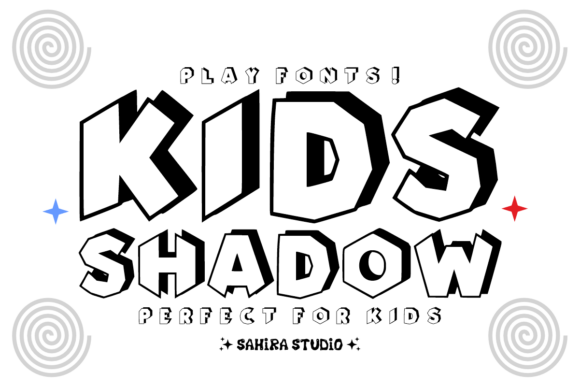
When designing for young audiences or creating high-energy visuals, the choice of typography often dictates the success of the entire project. Kids Shadow stands out as an incredibly dynamic and bold play font that brings the excitement of three-dimensional depth and movement to your text. It is not merely a decorative typeface; it is a tool designed to captivate young audiences by mimicking the energetic aesthetic of comic books and action graphics. Its unique feature lies in the angular, slightly slanted letterforms paired with a dramatic, offset 3D shadow effect. This combination creates an impactful look even when presented in a simple black-and-white outline, making it a versatile asset for game titles, children's book covers, and fun apparel designs.
However, like any specialized display font, Kids Shadow requires careful consideration before integration into a design workflow. Many creators assume that because a font looks "fun" or "bold," it will automatically improve their project. This assumption can lead to readability issues, visual clutter, and a disconnect between the message and the medium. Understanding how to apply this chunky, impactful display correctly ensures that your design feels ready to leap off the page without sacrificing clarity or professional quality.
Understanding the Visual Impact of Kids Shadow
The primary appeal of Kids Shadow is its ability to convey motion and depth without requiring complex color palettes. The angular geometry of the letters suggests speed, while the offset shadow provides a sense of volume. This makes it ideal for headers that need to grab attention instantly. For educators creating educational material requiring high visual interest, or marketers designing action-packed headers, this font offers a shortcut to a lively atmosphere.
Yet, the very features that make it exciting are also where common mistakes occur. The dramatic shadow effect, while visually striking, adds significant weight to the text. If used indiscriminately, this weight can overwhelm other design elements, causing the viewer to focus on the shape of the letters rather than the content they contain. It is crucial to recognize that Kids Shadow is a display font, meaning it is intended for short bursts of text at large sizes, not for extended reading passages.
Common Pitfalls When Using High-Contrast Display Fonts
One of the most frequent errors designers make with fonts like Kids Shadow is using them for body copy. Because the letterforms are thick and the shadows create internal complexity, reading long paragraphs becomes a strain on the eyes. This reduces usability and efficiency, particularly for younger readers who may still be developing their reading fluency. When a child struggles to distinguish individual characters due to excessive stylistic noise, the communication fails regardless of how "fun" the font appears.
Another overlooked detail is the interaction between the font and background colors. The offset 3D shadow relies on contrast to create its illusion of depth. Placing Kids Shadow on a busy patterned background or a color too similar to the shadow itself can cause the text to disappear or vibrate visually. This mistake affects presentation and satisfaction, as the audience may miss critical information entirely. Additionally, some users attempt to add their own drop shadows or effects to the font, compounding the issue and resulting in a muddy, unprofessional appearance.
Avoiding Clutter and Maintaining Readability
To avoid these pitfalls, treat Kids Shadow as a headline generator rather than a narrative tool. Limit its use to titles, logos, call-to-action buttons, or short phrases where impact is more important than volume. When you restrict the font to these specific roles, the dramatic 3D effect enhances the hierarchy of the design rather than disrupting it. For example, in a children's book cover, the title should pop with the full force of the font, but the blurb or author name should utilize a cleaner, simpler sans-serif or serif typeface to ensure legibility.
Consider the spacing carefully as well. The angular nature of the letters means that tight kerning (the space between characters) can make the text look like a solid block of ink. Increasing the letter-spacing slightly can help separate the forms, allowing the eye to track the words more easily. This small adjustment significantly improves the overall quality of the presentation without altering the character of the font.
Evaluating Suitability for Your Specific Project
Before downloading or purchasing Kids Shadow, evaluate whether its comic-book style aesthetic aligns with your brand identity or project goals. While it is perfect for game titles and fun apparel designs, it may feel out of place in contexts requiring subtlety or sophistication. If you are designing educational material, ensure that the "action-packed" vibe supports the learning objective rather than distracting from it. A font that screams "excitement" might undermine a lesson focused on calm reflection or serious study.
It is also essential to check the licensing terms associated with the font. As with many free or low-cost display fonts, usage rights can vary significantly between personal projects and commercial applications. Using a font commercially without the proper license can lead to legal complications and unnecessary costs down the line. Always verify that the license covers your intended scope, whether that is a small business logo, a marketing campaign, or a product for sale.
Practical Steps for Better Design Decisions
Here are practical steps to ensure you get the most out of Kids Shadow:
- Test at Multiple Sizes: Before committing, render the text at the actual size it will appear in the final product. What looks great on a monitor might become illegible on a small mobile screen or a printed flyer.
- Check Color Contrast: Ensure the foreground text and the shadow color have sufficient contrast against the background. Use accessibility tools to verify that the text meets standard readability guidelines.
- Pair with Neutral Fonts: Balance the boldness of Kids Shadow with a neutral companion font for body text. This creates a harmonious visual rhythm that guides the reader effectively.
- Resist Over-Editing: Avoid adding extra effects like glows, strokes, or gradients unless absolutely necessary. The built-in 3D shadow is usually sufficient to achieve the desired look.
By approaching Kids Shadow with a strategic mindset, you can leverage its unique capabilities to create designs that are both visually stunning and functionally effective. Whether you are a beginner looking to make your first poster or a professional refining a brand identity, understanding the limitations and strengths of this font will save you time and improve your results. Remember, the best design choices are those that serve the audience first, ensuring that the message is received clearly and enthusiastically.