Liquid Crome: A Guide to Mastering the Futuristic Display Font
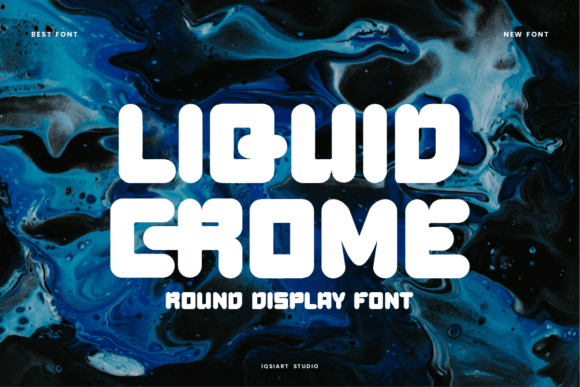
If you are looking for a typeface that screams high-tech innovation without relying on clichéd circuit board patterns, Liquid Crome is likely catching your eye. This bold, futuristic display font features rounded, fluid shapes that evoke a sense of space-age energy and sleek style. The letters appear to flow like molten metal or liquid light, creating an immersive look that stands out in both digital interfaces and print formats. However, while the aesthetic appeal is undeniable, using such a distinctive typeface requires more than just downloading it and applying it to your project. Many creators rush into using Liquid Crome without understanding its limitations, leading to designs that feel cluttered, unreadable, or tonally mismatched.
To get the most out of this edgy tech design tool, you need to approach it with a strategic mindset. Whether you are designing sci-fi posters, modern branding, video game assets, or music artwork, the difference between a professional result and an amateur one often lies in how well you manage the font's inherent characteristics. Let's explore the common pitfalls designers face when working with Liquid Crome and how to avoid them to ensure your project communicates exactly what you intend.
Understanding the Limits of Display Typography
The first mistake many beginners make is treating Liquid Crome as a workhorse font suitable for all text lengths. Because the font is so visually striking, there is a temptation to use it for headlines, subheadings, and even body copy. This is a critical error. Liquid Crome is a display font, meaning it is engineered specifically for large sizes and short bursts of text. Its soft curves and complex internal structures become difficult to decipher at smaller point sizes.
When you force a fluid, molten-metal style font into long paragraphs, readability plummets. The eye struggles to distinguish between similar characters, causing fatigue and disengagement. If your audience cannot read your message quickly, they will leave. To avoid this, reserve Liquid Crome strictly for titles, logos, and call-to-action buttons where impact matters more than volume. Pair it with a clean, neutral sans-serif font for any supporting text. This combination allows the futuristic energy of Liquid Crome to shine without sacrificing communication efficiency.
Navigating Licensing and PUA Encoding
A frequent oversight when evaluating fonts like Liquid Crome involves the technical details of installation and character access. One of the standout features of this typeface is its inclusion of PUA (Private Use Area) encoding. This means that special characters, decorative elements, and alternate glyphs are accessible directly within standard software without needing additional plugins or complex configuration files. While this is a significant advantage, it can lead to confusion if users do not know how to access these features correctly.
Many designers assume that because a font file is installed, all its features are automatically available in their default keyboard layout. This is rarely the case. Without checking the specific glyph map or using a character viewer tool, you might miss out on the very decorative elements that make the font unique. Before committing to a purchase or download, verify that your design software supports PUA encoding and learn how to insert these special characters. Ignoring this step can result in a generic-looking design that fails to utilize the full potential of the typeface, wasting both time and money.
Avoiding Visual Clutter in Branding
In the realm of modern branding and small business identity, the desire to stand out often leads to overdesigning. Liquid Crome is inherently bold and immersive; adding too many other visual effects can turn a sleek logo into a chaotic mess. A common mistake is applying heavy drop shadows, gradients, or 3D extrusions to the font itself. Since the letters already mimic liquid light and flowing metal, adding artificial depth can create a muddy, indistinct appearance that looks dated rather than futuristic.
Instead of piling on effects, let the shape of the font do the heavy lifting. The rounded, fluid nature of the characters provides enough visual interest on its own. For example, if you are creating a logo for a tech startup, try placing the Liquid Crome text against a stark, high-contrast background. Use negative space effectively to let the curves breathe. This approach ensures the brand feels sophisticated and forward-thinking rather than trying too hard to be "cool." Simplicity often amplifies the futuristic vibe more effectively than complexity.
Context Matters: When Not to Use It
Even though Liquid Crome is versatile enough for video games and music artwork, context is king. Using this font in inappropriate settings can undermine your credibility. For instance, applying a molten-metal aesthetic to a legal document, a medical report, or a conservative financial presentation sends the wrong message. It suggests a lack of seriousness or professionalism that could alienate your target audience.
Before deciding to use Liquid Crome, ask yourself if the tone matches the content. Is your project about innovation, entertainment, or cutting-edge technology? If the answer is yes, the font is a strong candidate. If your goal is to convey stability, tradition, or minimalism, this typeface may be a poor choice. Misalignment between font personality and brand voice is a subtle but damaging mistake that can confuse consumers and dilute your marketing efforts. Always evaluate the emotional response you want to elicit before finalizing your typography choices.
Practical Steps for Evaluation and Implementation
To ensure you are making the right decision for your project, follow these practical steps before integrating Liquid Crome into your workflow:
- Test Readability at Scale: Create mockups of your design at actual size. Zoom out to see how the text holds up from a distance, which is crucial for posters and signage.
- Check Character Support: Open the font in a glyph editor to confirm that all necessary special characters and accents are present and accessible via PUA encoding.
- Review Licensing Terms: Ensure the license covers your intended use, whether it is for commercial branding, merchandise, or digital distribution. Avoid legal headaches by reading the fine print.
- Pair Carefully: Experiment with different companion fonts to find a balance that enhances rather than competes with the main headline.
By taking the time to understand the strengths and limitations of Liquid Crome, you can harness its space-age energy effectively. The key is to respect the font's design intent while ensuring it serves your communication goals. With careful application, this bold, futuristic typeface can elevate your projects, delivering a sleek, undeniably cool look that resonates with your audience.